The Microsoft Assembler (commonly known as MASM) was software development tool created by Microsoft. It has been maintained and updated for over 30 years. Currently MASM32 SDK is an independent project that is designed to ease the entry of experienced programmers into the field of assembler language programming. It has freeware licence and available from http://www.masm32.com. It can be used for Windows NT bases operating systems including the latest ones. I installed it on Windows 8 and 10.
Installation is simple: download masm32 installer zip file, unpack it and run install.exe. By default the masm32 will be installed in c:\masm32 directory. During installation I had several warnings that some export functions could not be found in current OS DLL. However so far masm32 works fine for several applications I created.
For the first test I created the simple console application helloasm.asm:
;Hello ASM
.386
.model flat, stdcall
option casemap:none
include c:\masm32\include\windows.inc
include c:\masm32\include\kernel32.inc
includelib c:\masm32\lib\kernel32.lib
;**************************** data *************************************
.data
HelloASMMsg db 0dh,0ah,'Hello ASM!',0dh,0ah,0
stdout dd ?
cWritten dd ?
.data?
;**************************** code ******************************
.code
start:
invoke GetStdHandle, STD_OUTPUT_HANDLE
mov stdout, eax;
cmp eax,0
invoke WriteConsole, stdout, ADDR HelloASMMsg, sizeof HelloASMMsg, \
ADDR cWritten, NULL
invoke ExitProcess,NULL
end start
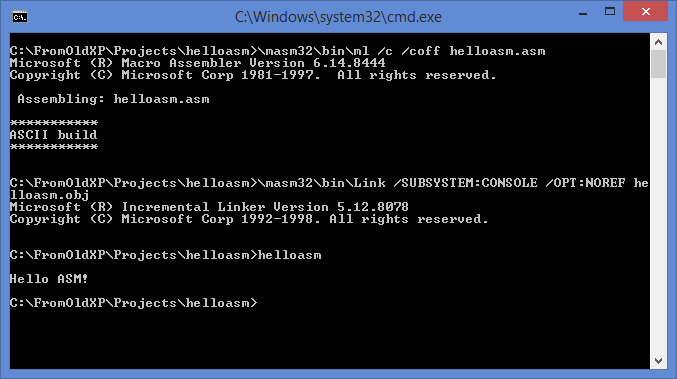
The application output text ‘Hello ASM!’ into console windows.
Compilation:
\masm32\bin\ml /c /coff helloasm.asm
The result of compilation is object file – helloasm.obj.
Linking:
\masm32\bin\link /SUBSYSTEM:CONSOLE helloasm.obj
The result of linking process is executable file – helloasm.exe.
To get list of compiler and linker option start \masm32\bin\ml and \masm32\bin\link with /? argument.